> For the complete documentation index, see [llms.txt](https://docs.ama.one/llms.txt). Markdown versions of documentation pages are available by appending `.md` to page URLs; this page is available as [Markdown](https://docs.ama.one/wallet/creating-a-wallet/chrome-extension-wallet/8.-signing-transactions.md).
# 8. Signing Transactions
Learn how to sign transactions when interacting with decentralized applications (dApps) using the Amadeus Wallet Extension.
### Overview
When you interact with dApps on the Amadeus blockchain, they may request you to sign transactions. The wallet extension provides a secure interface to review and approve these transaction requests.
### How It Works
1. **dApp Request**: A dApp requests a transaction signature
2. **Extension Notification**: The extension shows a notification
3. **Review Request**: You review the transaction details
4. **Approve or Reject**: You decide to approve or reject
5. **Transaction Signed**: If approved, transaction is signed and returned
### Receiving Sign Requests
#### Automatic Notification
When a dApp requests a transaction:
* The extension icon shows a badge notification
* Clicking the extension opens the sign request page
* You'll see the transaction details to review
#### Sign Request Page
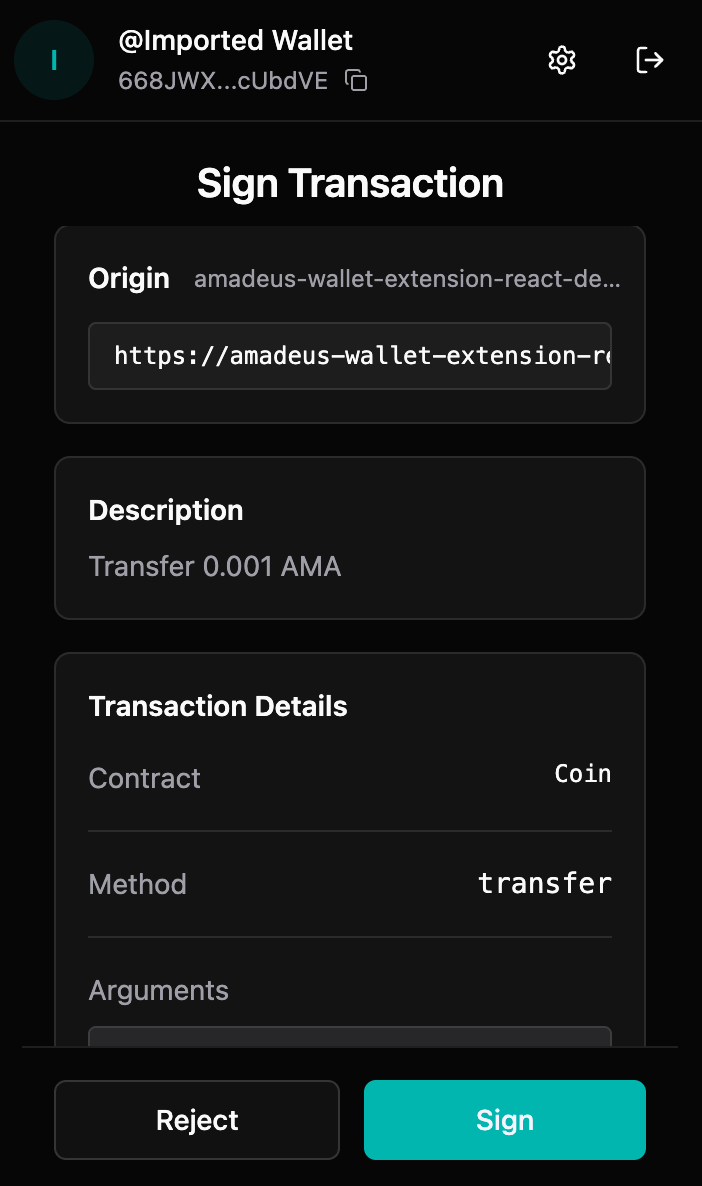
The sign request page shows:
* **Origin**: Which website is requesting the signature
* **Description**: Optional description from the dApp
* **Contract**: Smart contract address
* **Method**: Function being called
* **Arguments**: Parameters for the function call
### Reviewing Transaction Requests
#### Step 1: Review Origin
1. Check which website is requesting the signature
2. Verify it's a trusted dApp
3. Ensure the domain matches the expected dApp
#### Step 2: Review Details
1. **Description**: Read any description provided by the dApp
2. **Contract**: Verify the contract address is correct
3. **Method**: Understand what function is being called
4. **Arguments**: Review all parameters being passed
#### Step 3: Verify Safety
Before approving, verify:
* ✅ You trust the dApp
* ✅ The transaction details are correct
* ✅ You understand what the transaction does
* ✅ The amount (if any) is correct
### Approving Transactions
#### Step 1: Click "Sign"
1. After reviewing, click **"Sign"**
2. If your wallet is locked, you'll be prompted to unlock
3. Enter your password to unlock
#### Step 2: Processing
* The extension processes your approval
* Transaction is signed with your private key
* You'll see a "Processing" screen
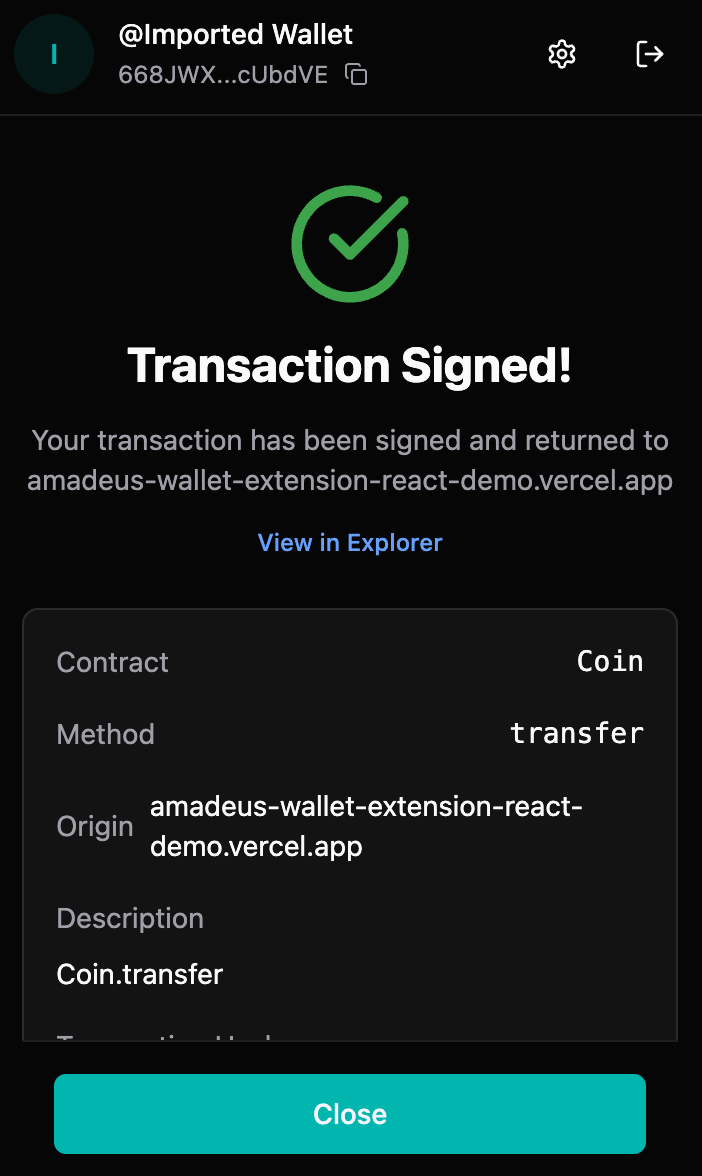
#### Step 3: Success
* Transaction is signed successfully
* Transaction hash is displayed
* You can view it in the explorer
* Transaction is returned to the dApp
### Rejecting Transactions
#### When to Reject
Reject transactions if:
* ❌ You don't trust the dApp
* ❌ Transaction details look suspicious
* ❌ Amount or parameters are incorrect
* ❌ You didn't initiate the transaction
* ❌ Something seems wrong
#### How to Reject
1. Click **"Reject"** on the sign request page
2. Transaction request is cancelled
3. dApp receives rejection notification
4. No transaction is signed
### Security Best Practices
#### Always Review
* ✅ **Always review** transaction details before approving
* ✅ **Verify origin** - ensure it's from a trusted source
* ✅ **Check amounts** - verify any token amounts
* ✅ **Understand actions** - know what the transaction does
#### Red Flags
Be cautious of:
* ⚠️ Requests from unknown websites
* ⚠️ Unexpected transaction requests
* ⚠️ Requests for large amounts
* ⚠️ Transactions you didn't initiate
* ⚠️ Suspicious contract addresses
#### Never Approve
* ❌ Transactions you don't understand
* ❌ Requests from untrusted sources
* ❌ Transactions with incorrect details
* ❌ Anything that seems suspicious
### Transaction Types
#### Token Transfers
* **Contract**: Coin contract
* **Method**: transfer
* **Arguments**: \[recipient, amount, symbol]
* **Common**: Most common transaction type
#### Contract Interactions
* **Contract**: Various smart contracts
* **Method**: Various functions
* **Arguments**: Contract-specific parameters
* **Use Case**: Interacting with DeFi, NFTs, etc.
### Error Handling
#### Common Errors
**"Wallet is locked"**
* Unlock your wallet first
* Then approve the transaction
**"Insufficient balance"**
* Ensure you have enough tokens
* Check your balance before approving
**"Invalid transaction"**
* Transaction may be malformed
* Reject and contact dApp support
**"Network mismatch"**
* Ensure you're on the correct network
* Switch networks if needed
### dApp Integration
#### For Developers
dApps integrate with the wallet using:
```javascript
// Request accounts
const accounts = await window.amadeus.requestAccounts()
// Sign transaction
const result = await window.amadeus.signTransaction({
contract: 'Coin',
method: 'transfer',
args: [recipient, amount, symbol],
description: 'Send tokens'
})
```
See dApp Integration Guide for developers.
### Troubleshooting
#### Sign request not appearing
**Possible causes:**
* Extension not installed or enabled
* dApp not properly integrated
* Browser compatibility issues
**Solutions:**
* Verify extension is installed and enabled
* Refresh the dApp page
* Check browser console for errors
* Ensure dApp is using correct integration
#### Transaction stuck
**If transaction is stuck:**
* Check transaction status in explorer
* Verify network connectivity
* Try rejecting and re-requesting
* Contact dApp support if persistent
#### Wrong transaction details
**If details seem wrong:**
* Reject the transaction
* Contact dApp support
* Verify you're on correct dApp
* Check for phishing attempts
### Best Practices
1. **Review Carefully**: Always review transaction details
2. **Start Small**: Test with small amounts first
3. **Verify Origin**: Ensure requests are from trusted sources
4. **Understand Actions**: Know what transactions do
5. **Keep Updated**: Keep extension updated for security
### What's Next?
* [View signed transactions in your history](/wallet/creating-a-wallet/chrome-extension-wallet/7.-transaction-history.md)
* [Learn about dApp integration (for developers)](/wallet/creating-a-wallet/chrome-extension-wallet/10.-integration-guide.md)
* [Configure network settings for dApps](/wallet/creating-a-wallet/chrome-extension-wallet/9.-network-settings.md)