> For the complete documentation index, see [llms.txt](https://docs.ama.one/llms.txt). Markdown versions of documentation pages are available by appending `.md` to page URLs; this page is available as [Markdown](https://docs.ama.one/wallet/creating-a-wallet/chrome-extension-wallet/9.-network-settings.md).
# 9. Network Settings
Learn how to configure network settings in the Amadeus Wallet Extension, including switching between Mainnet and Testnet, and configuring custom RPC endpoints.
### Overview
The Amadeus Wallet Extension supports multiple networks:
* **Mainnet**: Production network with real tokens
* **Testnet**: Testing network with test tokens
* **Custom RPC**: Connect to custom network endpoints
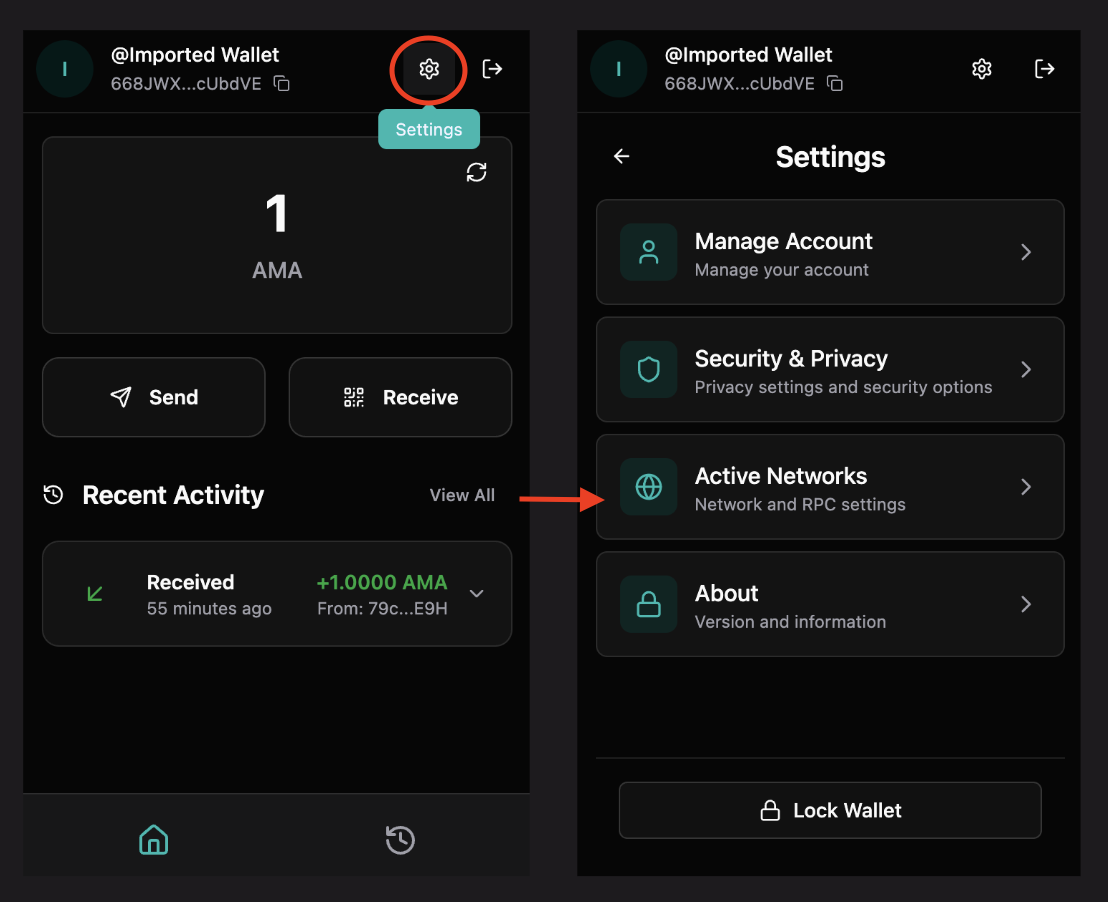
### Accessing Network Settings
1. Open the Amadeus Wallet Extension
2. Go to **Settings**
3. Click **"Active Networks"**
### Network Options
#### Mainnet
**Purpose**: Production network for real transactions
**Configuration**:
* **RPC URL**: `https://nodes.amadeus.bot`
* **Explorer**: `https://explorer.ama.one`
* **Tokens**: Real AMA tokens with actual value
**When to use**:
* Real transactions
* Production dApps
* Actual token transfers
#### Testnet
**Purpose**: Testing network for development and testing
**Configuration**:
* **RPC URL**: `https://testnet-rpc.ama.one`
* **Explorer**: `https://testnet.explorer.ama.one`
* **Tokens**: Test tokens with no real value
**When to use**:
* Testing transactions
* Development work
* Learning and experimentation
* Trying new features
#### Custom RPC
**Purpose**: Connect to custom network endpoints
**Configuration**:
* **RPC URL**: Your custom endpoint
* **Explorer URL**: Optional custom explorer
* **Use Case**: Private networks, local development, custom nodes
**When to use**:
* Local development
* Private networks
* Custom node configurations
* Testing with specific nodes
### Switching Networks
#### Step 1: Open Network Settings
1. Go to **Settings** → **Active Networks**
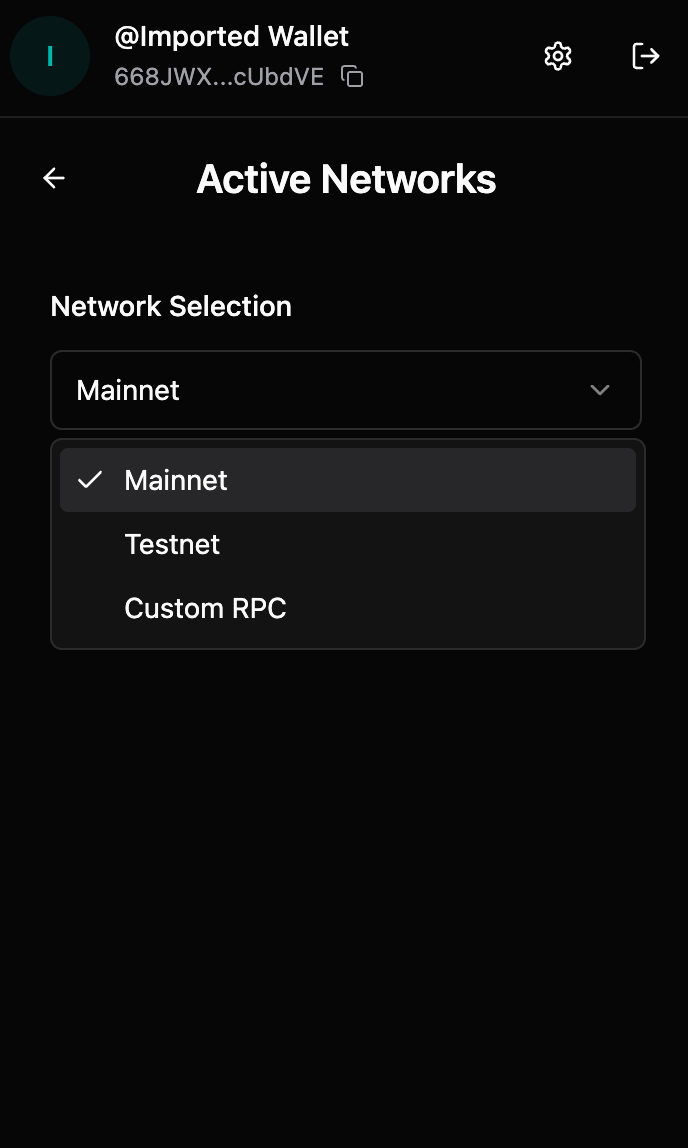
2. You'll see the network selection dropdown
#### Step 2: Select Network
1. Click the network dropdown
2. Select your desired network:
* **Mainnet**
* **Testnet**
* **Custom RPC**
#### Step 3: Network Active
* Selected network becomes active immediately
* All transactions use the new network
* Balance and history sync to the new network
### Configuring Custom RPC
#### Step 1: Select Custom RPC
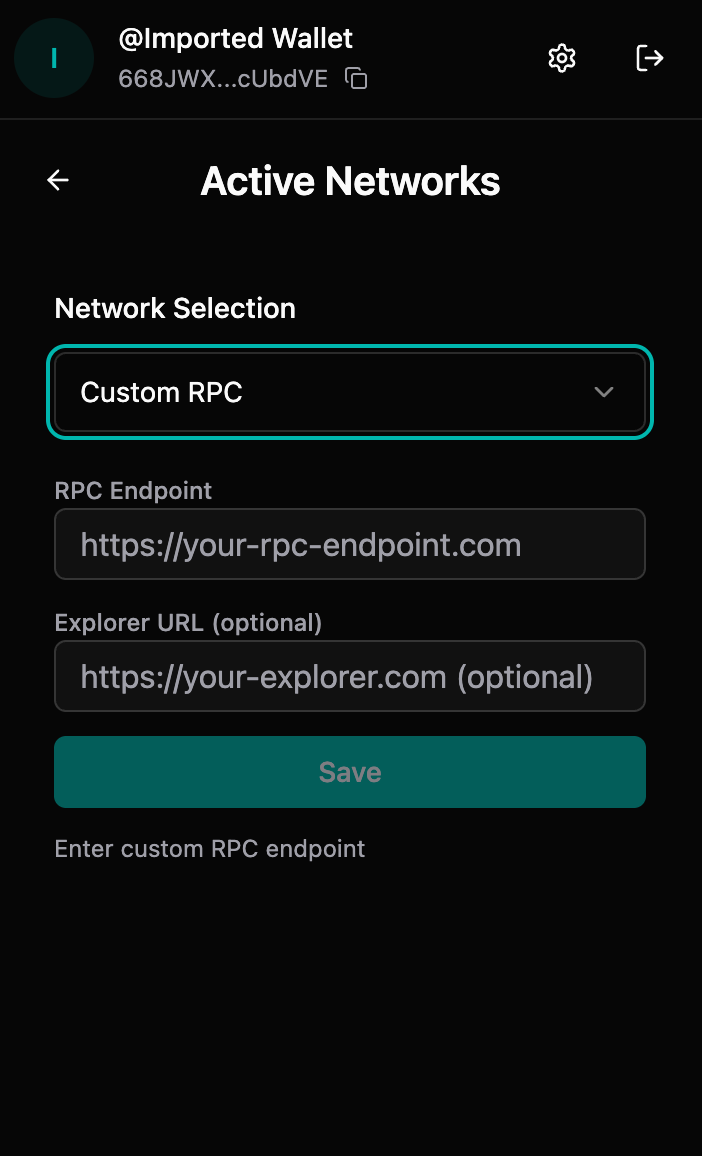
1. In network settings, select **"Custom RPC"**
2. Input fields will appear for configuration
#### Step 2: Enter RPC Endpoint
1. **RPC Endpoint** field:
* Enter your custom RPC URL
* Format: `https://your-rpc-endpoint.com`
* Must be a valid HTTP/HTTPS URL
* Click **"Save"** when done
#### Step 3: Enter Explorer URL (Optional)
1. **Explorer URL** field (optional):
* Enter custom explorer URL if available
* Format: `https://your-explorer.com`
* Leave empty to use default explorer
* Click **"Save"** when done
#### Step 4: Save Configuration
1. Click **"Save"** button
2. Custom network becomes active
3. Extension connects to your custom endpoint
### Network-Specific Data
#### Important Notes
* **Balances**: Separate for each network
* **Transaction History**: Network-specific
* **Addresses**: Same address across networks (but balances differ)
* **Tokens**: Network-specific token balances
#### Switching Considerations
When switching networks:
* ⚠️ Your balance will change (network-specific)
* ⚠️ Transaction history is separate per network
* ⚠️ Ensure you're on the correct network for your use case
* ⚠️ Transactions on one network don't appear on another
### Verifying Network
#### Check Current Network
1. Go to **Settings** → **Active Networks**
2. Current network is displayed at the top
3. Network details shown below
#### Network Indicators
* Network name displayed in settings
* Explorer links use current network
* Transaction history filtered by network
### Troubleshooting
#### Wrong network selected
**If you're on the wrong network:**
1. Go to network settings
2. Switch to correct network
3. Verify balance and transactions
4. Ensure dApp matches your network
#### Custom RPC not connecting
**Possible causes:**
* Invalid RPC URL
* Network connectivity issues
* RPC endpoint down
* CORS or security restrictions
**Solutions:**
* Verify RPC URL is correct and accessible
* Check internet connection
* Test RPC endpoint in browser
* Contact RPC provider if issues persist
#### Balance not showing
**If balance doesn't appear:**
* Verify network is correct
* Check internet connection
* Wait for sync to complete
* Refresh the extension
* Verify address on explorer
#### Transactions on wrong network
**If transactions appear on wrong network:**
* Switch to the correct network
* Transactions are network-specific
* Cannot transfer between networks
* Verify network before transactions
### Best Practices
1. **Verify Network**: Always verify network before transactions
2. **Test First**: Use Testnet for testing
3. **Match dApps**: Ensure dApp network matches wallet network
4. **Custom RPC**: Only use trusted custom RPC endpoints
5. **Network Awareness**: Be aware which network you're on
### Security Considerations
#### Network Security
* ✅ Use official network endpoints when possible
* ✅ Verify custom RPC endpoints are trusted
* ✅ Be cautious with custom networks
* ❌ Don't use untrusted custom RPC endpoints
* ❌ Verify network before large transactions
#### Phishing Prevention
* Always verify you're on the correct network
* Check network settings regularly
* Be cautious of network switching prompts
* Verify dApp network matches wallet network
### Advanced Configuration
#### Custom Network Use Cases
* **Local Development**: Connect to local node
* **Private Networks**: Connect to private blockchain
* **Testing**: Use test networks
* **Custom Nodes**: Connect to specific node providers
#### RPC Endpoint Requirements
Custom RPC endpoints must:
* Support HTTP/HTTPS
* Implement Amadeus RPC API
* Be accessible from your browser
* Have proper CORS configuration
### What's Next?
* [Send tokens on your selected network](/wallet/creating-a-wallet/chrome-extension-wallet/5.-sending-tokens.md)
* [View transaction history for your network](/wallet/creating-a-wallet/chrome-extension-wallet/7.-transaction-history.md)